 Speaker Doc
How to test your iPhone speaker
Play a song you know well, quietly and then loud, make a call with the phone at your ear, and record a voice memo. That takes five minutes and tells you whether both speakers sound right.
Checking it with what's already on your phone
Do this in a quiet room, with the case off and Bluetooth turned off so the sound really comes from the iPhone.
- Play a song you know well at low volume. Voices should sound clear and close, without that underwater dullness.
- Turn it up to full volume and listen for crackling, buzzing or a rattle on the bass notes.
- Call someone and hold the phone to your ear. That's the earpiece, the small slot above the screen. Then switch to speaker and ask them how you sound.
- Open Voice Memos, say a few sentences with the bottom of the phone towards your mouth, and play it back. This checks the microphone and the bottom speaker in one go.
If you have a second iPhone around, play the same song on both. Your ears adjust surprisingly fast, and a side by side comparison is far more honest than memory.
What crackle, buzz or a dull sound usually means
- A dull sound, as if it's coming through a pillow, usually means water or dirt in the speaker grille. The high notes go first. It tends to come back as the phone dries.
- A buzz or rattle on bass notes can be a droplet or a speck of dirt vibrating in the grille. It can also be a damaged speaker, so retest once the phone is dry and the openings are clean.
- Crackling or distortion at full volume that's still there two days after the phone got wet points to the speaker itself.
- No sound at all is worth checking twice. Make sure nothing is connected over Bluetooth before you assume the worst.
Right after water, most of these are temporary. What to do when the speaker stays muffled covers how long to wait and when to get it repaired.
Testing it with Speaker Doc
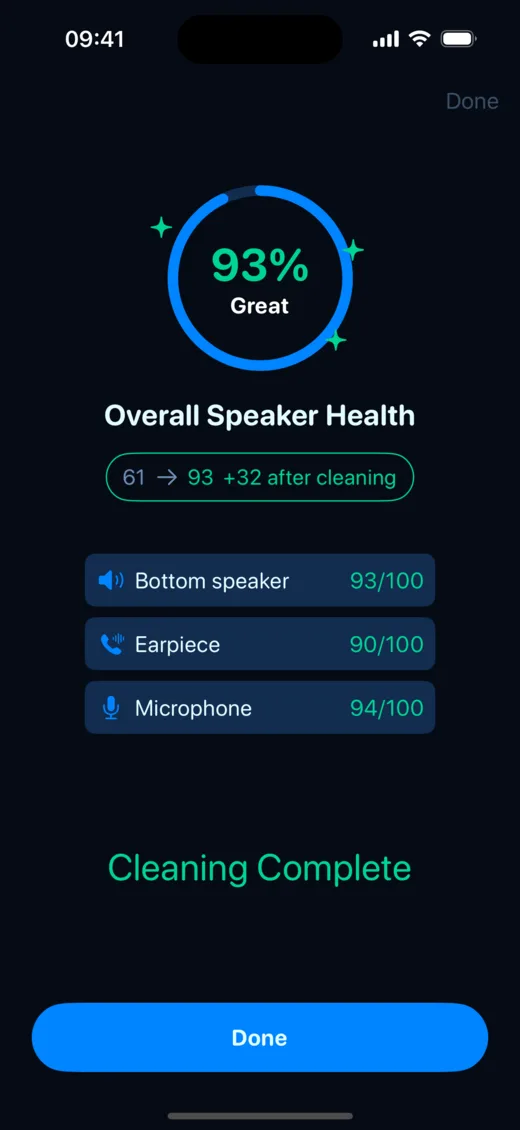
What the free test does
Tap the score ring on the main screen. The app first listens to the room for a moment, then plays five short tones, at 500, 1,000, 2,000, 4,000 and 6,000 Hz, through the bottom speaker and records them with the bottom microphone. On iPhone it then switches to the earpiece and records with the front microphone. The whole thing takes under a minute.
Reading the score
The score runs from 35 to 95, and higher means clearer. Water muffles high tones before low ones, so the app compares how loud the highs come back against the lows. Each test is compared with the best result your own phone has given before. A lower number means your speaker sounds worse than it has on this phone. It says nothing about how it compares with someone else's iPhone.
You get a row for the bottom speaker, the earpiece and the microphone. A row well below the others shows you where the problem is. After every clean the test runs again on its own and shows how many points you gained.
Why two tests in a row can disagree
The test listens with the phone's own microphone, so anything else it hears gets mixed in. A TV, traffic outside or someone talking can pull the score down. The app checks the noise before it starts, and when the room is too loud it says so and asks you to test again somewhere quieter.
Position matters too. A thumb over the bottom edge, a phone lying on a sofa cushion or a thick case can all change the result by a few points. For results you can compare, lay the phone flat on a hard table with nothing touching the bottom edge, and test in the same spot each time.
What the test can't tell you
The score is an estimate. A phone microphone isn't a calibrated lab instrument, and the test can only hear what comes out of the speaker. It can't see inside the phone or tell water from dirt or a worn speaker. It also has nothing to say about the charging port or a "Liquid detected" alert. It doesn't test AirPods or Bluetooth speakers either.
If you're checking a phone before you buy it, testing a used iPhone adds the microphone and camera checks. The details of how the score is worked out are on our about page.
 Run the free speaker test · iPhone and iPad, iOS 17+
Quick answers
How do I know if my iPhone speaker is damaged or just wet?
Give it a day or two to dry, then test again. A wet speaker gets better as it dries. One that still crackles, buzzes or sounds dull after 48 hours, with clean openings, probably needs a repair.
Is the Speaker Doc speaker test free?
Yes. The Speaker Test and the score are free with no limit and no ads, and so is Turbo Clean.
Does the test work on iPad?
Yes, but an iPad has no earpiece, so the test checks the bottom speaker only.